
Introduction
Welcome to my new site! After spending quite a bit of time away I decided it was time to get back to writing, researching, and contributing again. For a number of reasons, I did not want to continue with my traditional hosted Wordpress site. I wanted something simple, fast, and cost effective so ultimately I landed on a static website generated in Hugo and hosted on Amazon S3.
For anyone that’s interested, I’ve provided some details on how I achieved this below.
The Design
The design is pretty straightforward:
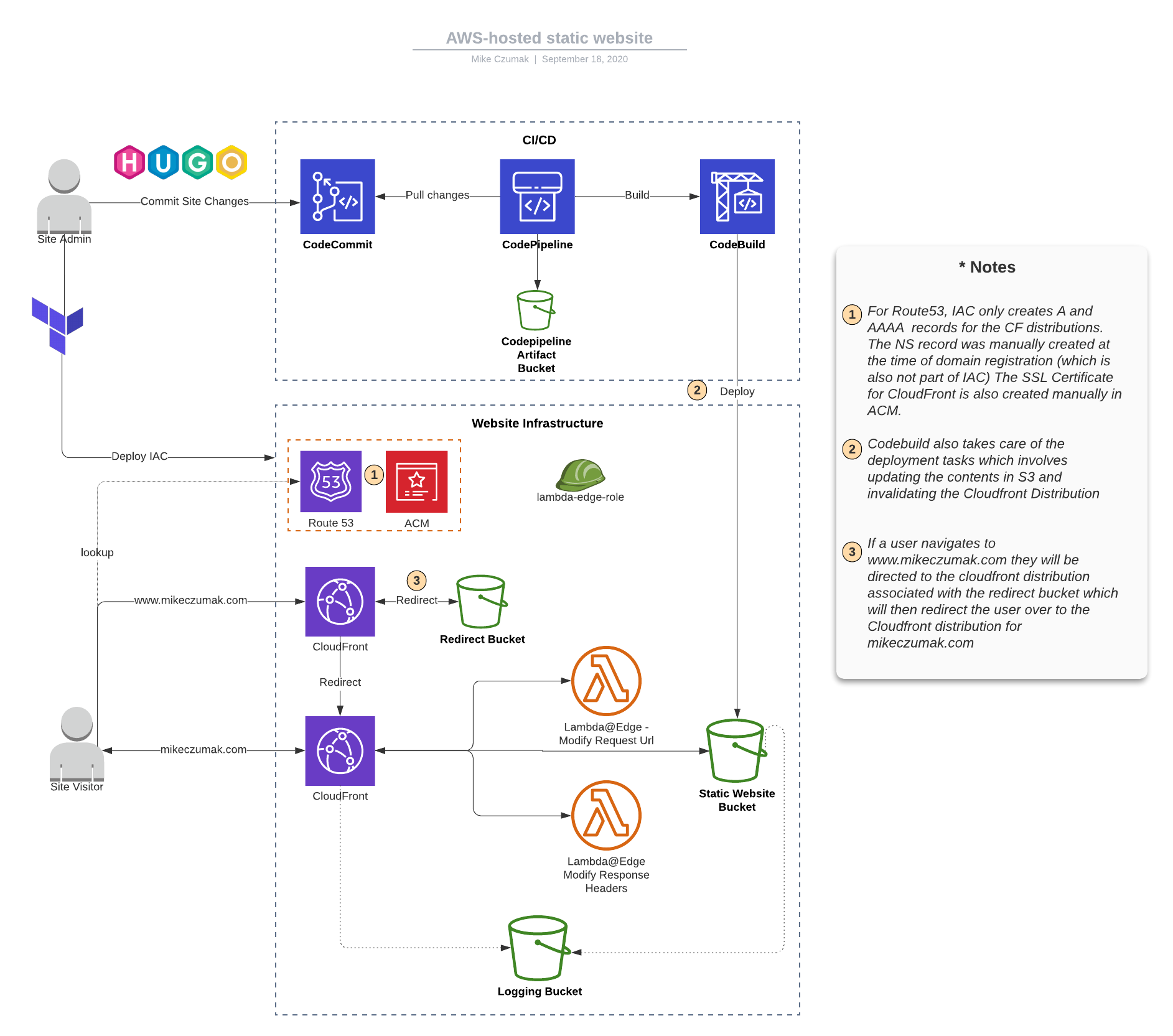
As you can see, the top portion represents the very basic CI/CD pipeline I built out in CodePipeline. It’s manual for now … I know, I feel ashamed for even saying that. All that pointing and clicking just felt wrong but eventually I’ll get around to putting it into Terraform or CFN.
The bottom portion of the diagram represents the supporting infrastructure, nearly all of which I did write as IaC using Terraform – with the exception of the initial registration of the domain via Route53 and the SSL cert creation in ACM (neither of which I intend to do again any time soon).
I’ll walk through some of the infrastructure components followed by a review of the pipeline.
A closer look at the infastructure
S3 buckets
I needed three S3 buckets, one to host the static website content, one to serve a redirect from “www.mikeczumak.com” and a third for logging..
Since I’m using CloudFront, there’s no need to make the static website hosting bucket public. In fact, I was able to apply a public access block and only provide the CloudFront OAI with read permissions via the REST API endpoint.
# adding the public access block
resource "aws_s3_bucket_public_access_block" "main" {
  bucket                  = aws_s3_bucket.main.id
  block_public_acls       = true
  block_public_policy     = true
  ignore_public_acls      = true
  restrict_public_buckets = true
}

# Main static website bucket policy document
# TODO: Stop being lazy and get the codebuild piece in IaC
data "aws_iam_policy_document" "main" {
  statement {
    actions = ["s3:GetObject"]
    principals {
      type        = "AWS"
      identifiers = ["${aws_cloudfront_origin_access_identity.origin_access_identity.iam_arn}"]
    }
    resources = ["${aws_s3_bucket.main.arn}/*"]
  }
  statement {
    actions = ["s3:DeleteObject"]
    principals {
      type        = "AWS"
      identifiers = ["arn:aws:iam::[ACCT]:role/service-role/[CODE_BUILD_ROLE]"]
    }
    resources = ["${aws_s3_bucket.main.arn}/*"]
  }
}
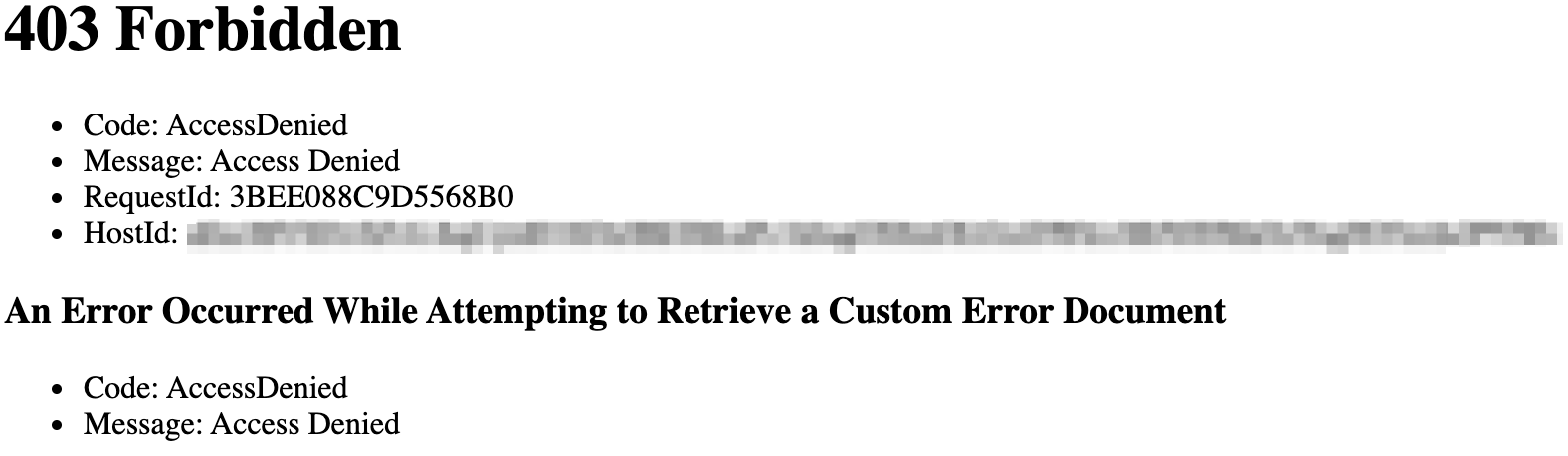
If a user tries to navigate directly to the bucket, they will get this:
I ended up having to set up the redirect bucket slightly different. While I would have preferred to set it up to use an OAI and the REST API endpoint, I couldn’t get it to work (and AWS documentation suggests it’s not possible). I experimented with a number of different configurations but ultimately found that I could set it up for website hosting, configure a redirect on the bucket and associate a dedicated Cloudfront distribution and still configure private ACLs.
# Bucket for redirecting from www
resource "aws_s3_bucket" "redirect" {
  acl = "private"
  bucket = "www.${var.domain}"
  logging {
    target_bucket = aws_s3_bucket.logging.bucket
    target_prefix = "${var.domain}-redirect/"
  }
  force_destroy = true

  website {
    redirect_all_requests_to = "https://${var.domain}"
  }
}
I did consider doing an A or CNAME record in route53 rather than a redirect but I didn’t want two records pointing to the same objects (probably not ideal for analytics).
There’s nothing fancy about the Terraform for the remainder of the S3 portion but feel free to reference the code at the end of this post if you’d like a closer look.
ACM
Since I issued the cert manually at the time of domain registration, the only thing to do in the IaC is to grab its info so it can be used with CloudFront:
# Get cert ARN (note: assumes it is created manually outside of this template)
data "aws_acm_certificate" "wildcard_cert" {
  provider = aws

  domain      = "*.${var.domain}"
  statuses    = ["ISSUED"]
  most_recent = true
}
Cloudfront
This was the most involved portion of this build with a bit of trial and error but in the end, nothing overly complex.
I needed two different distributions, one for the bucket hosting the site contents and one for the redirect and they’re each a little different.
As mentioned earlier, for the bucket hosting the actual site content I set up an OAI restriction as I wanted to restrict access to only CloudFront via the API endpoint:
origin {
    domain_name = "${aws_s3_bucket.main.bucket_regional_domain_name}"
    origin_id   = "${local.s3_origin_id}"

    s3_origin_config {
      origin_access_identity = "${aws_cloudfront_origin_access_identity.origin_access_identity.cloudfront_access_identity_path}"
    }
  }
It’s important to note that use of an OAI is only possible with the S3 bucket API endpoint and cannot be used with the website endpoint. I’ll show what that means for the redirect bucket shortly.
I configured a custom error page for this bucket which is a bit nicer user experience than the default CloudFront error:
custom_error_response {
      error_code          = 404
      response_code       = 200
      response_page_path  = "/404.html"
    }
I went with the cheaper price class and don’t apply any geo restrictions at the moment
aliases = ["${var.domain}"]
default_root_object = "index.html"
enabled         = true
is_ipv6_enabled = true
price_class = "PriceClass_100"

restrictions {
  geo_restriction {
    restriction_type = "none"
    }
}
I have not yet enabled the new real time logs feature but might in the near future. For now I just have basic logging to S3.
 logging_config {
    include_cookies = false
    bucket          = aws_s3_bucket.logging.bucket_domain_name
    prefix          = "cloudfront/"
  }
The previously referenced cert is applied along with SNI-only SSL support.
 viewer_certificate {
    acm_certificate_arn      = data.aws_acm_certificate.wildcard_cert.arn
    minimum_protocol_version = "TLSv1"
    ssl_support_method       = "sni-only"
  }
Since this is a static site, I limit the allowed methods to just GET and HEAD for both default and ordered cache behavior.
...
    allowed_methods = ["GET", "HEAD"]
    cached_methods  = ["GET", "HEAD"]
...
There are two lambda@Edge functions I leverage to to modify both requests and responses.
//Lambda@Edge association
    lambda_function_association {
      event_type   = "origin-response"
      lambda_arn   = aws_lambda_function.security_headers_lambda.qualified_arn
      include_body = false
    }

    //Lambda@Edge association
    lambda_function_association {
      event_type   = "origin-request"
      lambda_arn   = aws_lambda_function.add_index_lambda.qualified_arn
      include_body = false
    }
The origin-request function modifies the requests to append a default index.html object when the path ends in “/” (since S3 buckets can’t do that natively). You can find that code here
The origin response function adds security headers (X-XSS-Protection, Strict Transport Security, X-Frame-Options, etc.) You can find that code here
Now moving on to the redirect bucket…besides not needing things like custom error pages and lambda functions, the biggest difference with this bucket is tha it must reference the website endpoint to successfully perform the redirect (REST API does not support that functionality). We accomplish that with a custom origin config. Here’s what that looks like:
origin {
    domain_name = "${aws_s3_bucket.redirect.website_endpoint}"
    origin_id   = "${local.s3_origin_id}-redirect"

    custom_origin_config {
      origin_protocol_policy = "http-only"
      http_port  = "80"
      https_port = "443"
      origin_ssl_protocols = ["TLSv1.2"]
    }
  }
Aside from the Lambda roles, there’s not much else to CloudFront. You can see the rest of it along with all of the other configurations in the complete Terraform section below.
Route53
DNS here is pretty simple. As I stated, I registered the domain and set up the NS record outside of Terraform so all that’s left to do is some simple A/AAAA records for the cloudfront disributions (also in the complete terraform below).
The Complete Terraform
Click to expand
/* Static website version 1.0 */

variable "domain" {
  default = "[YOUR_DOMAIN]"
}

locals {
  s3_origin_id = "origin-${element(split(".", var.domain),0)}"
}

provider "aws" {
  version = "~>2.60"
  region = "us-east-1"
  shared_credentials_file = "~/.aws/credentials"
  profile = "[YOUR_PROFILE]"
}

/*
    S3 resources for logging and main site content hosting.
*/

# Logging Bucket
resource "aws_s3_bucket" "logging" {
  bucket = "${var.domain}-logs"
  acl    = "log-delivery-write"
}

# Bucket for redirecting from www
resource "aws_s3_bucket" "redirect" {
  acl = "private"
  bucket = "www.${var.domain}"
  logging {
    target_bucket = aws_s3_bucket.logging.bucket
    target_prefix = "${var.domain}-redirect/"
  }
  force_destroy = false

  website {
    redirect_all_requests_to = "https://${var.domain}"
  }
}

# Main static website bucket
resource "aws_s3_bucket" "main" {
  bucket = var.domain
  acl = "private"
  logging {
    target_bucket = aws_s3_bucket.logging.bucket
    target_prefix = "${var.domain}/"
  }

  website {
    index_document = "index.html"
    error_document = "404.html"
  }
}

# Main static website bucket public access block
resource "aws_s3_bucket_public_access_block" "main" {
  bucket                  = aws_s3_bucket.main.id
  block_public_acls       = true
  block_public_policy     = true
  ignore_public_acls      = true
  restrict_public_buckets = true
}

# Main static website bucket policy document
# TODO: Stop being lazy and get the codebuild piece in IaC
data "aws_iam_policy_document" "main" {
  statement {
    actions = ["s3:GetObject", "s3:ListBucket"]
    principals {
      type        = "AWS"
      identifiers = ["${aws_cloudfront_origin_access_identity.origin_access_identity.iam_arn}"]
    }
    resources = ["${aws_s3_bucket.main.arn}/*",
                "${aws_s3_bucket.main.arn}"]
  }
  statement {
    actions = ["s3:DeleteObject"]
    principals {
      type        = "AWS"
      identifiers = ["arn:aws:iam::[ACCT]:role/service-role/[CODE_BUILD_ROLE]"]
    }
    resources = ["${aws_s3_bucket.main.arn}/*"]
  }
}

# Main static website bucket policy
resource "aws_s3_bucket_policy" "main" {
  bucket = "${aws_s3_bucket.main.id}"
  policy = "${data.aws_iam_policy_document.main.json}"
}

/*
  ACM
*/

# Get cert ARN (note: assumes it is created manually outside of this template)
data "aws_acm_certificate" "wildcard_cert" {
  provider = aws
  domain      = "*.${var.domain}"
  statuses    = ["ISSUED"]
  most_recent = true
}

/*
    Cloudfront
*/

resource "aws_cloudfront_origin_access_identity" "origin_access_identity" {
}

resource "aws_cloudfront_distribution" "cdn-redirect" {

  origin {
    domain_name = "${aws_s3_bucket.redirect.website_endpoint}"
    origin_id   = "${local.s3_origin_id}-redirect"

    custom_origin_config {
      origin_protocol_policy = "http-only"
      http_port  = "80"
      https_port = "443"
      origin_ssl_protocols = ["TLSv1.2"]
    }
  }

  aliases = ["www.${var.domain}"]
  enabled         = true
  is_ipv6_enabled = true

  price_class = "PriceClass_100"

  restrictions {
    geo_restriction {
      restriction_type = "none"
    }
  }

  logging_config {
    include_cookies = false
    bucket          = aws_s3_bucket.logging.bucket_domain_name
    prefix          = "cloudfront-redirect/"
  }

  viewer_certificate {
    acm_certificate_arn      = data.aws_acm_certificate.wildcard_cert.arn
    minimum_protocol_version = "TLSv1"
    ssl_support_method       = "sni-only"
  }

  default_cache_behavior {
    target_origin_id = "${local.s3_origin_id}-redirect"

    allowed_methods = ["GET", "HEAD"]
    cached_methods  = ["GET", "HEAD"]

    viewer_protocol_policy = "redirect-to-https"
    compress               = true
    min_ttl                = 0
    default_ttl            = 300
    max_ttl                = 1200

    forwarded_values {
      query_string = false

      cookies {
        forward = "none"
      }
    }
  }
}

resource "aws_cloudfront_distribution" "cdn" {

  origin {
    domain_name = "${aws_s3_bucket.main.bucket_regional_domain_name}"
    origin_id   = "${local.s3_origin_id}"

    s3_origin_config {
      origin_access_identity = "${aws_cloudfront_origin_access_identity.origin_access_identity.cloudfront_access_identity_path}"
    }
  }

  custom_error_response {
      error_code          = 404
      response_code       = 200
      response_page_path  = "/404.html"
    }

  aliases = ["${var.domain}" ]
  default_root_object = "index.html"
  enabled         = true
  is_ipv6_enabled = true
  price_class = "PriceClass_100"

  restrictions {
    geo_restriction {
      restriction_type = "none"
    }
  }

  logging_config {
    include_cookies = false
    bucket          = aws_s3_bucket.logging.bucket_domain_name
    prefix          = "cloudfront/"
  }

  viewer_certificate {
    acm_certificate_arn      = data.aws_acm_certificate.wildcard_cert.arn
    minimum_protocol_version = "TLSv1"
    ssl_support_method       = "sni-only"
  }

  default_cache_behavior {
    target_origin_id = "${local.s3_origin_id}"

    allowed_methods = ["GET", "HEAD"]
    cached_methods  = ["GET", "HEAD"]

    viewer_protocol_policy = "redirect-to-https"
    compress               = true
    min_ttl                = 0
    default_ttl            = 300
    max_ttl                = 1200

    //Lambda@Edge association
    lambda_function_association {
      event_type   = "origin-response"
      lambda_arn   = aws_lambda_function.security_headers_lambda.qualified_arn
      include_body = false
    }

    //Lambda@Edge association
    lambda_function_association {
      event_type   = "origin-request"
      lambda_arn   = aws_lambda_function.add_index_lambda.qualified_arn
      include_body = false
    }

    forwarded_values {
      query_string = false

      cookies {
        forward = "none"
      }
    }
  }
}

resource "aws_lambda_function" "security_headers_lambda" {
  function_name = "security_headers"
  role          = aws_iam_role.edge_lambda.arn
  handler       = "securityHeaders.handler"
  runtime       = "nodejs10.x"

  filename         = "[PATH/TO/LAMBDA].zip"
  source_code_hash = filebase64sha256("lambda-securityHeaders.zip")

  publish = true
  provider = aws

}

resource "aws_lambda_function" "add_index_lambda" {
  function_name = "add_index"
  role          = aws_iam_role.edge_lambda.arn
  handler       = "addIndex.handler"
  runtime       = "nodejs10.x"

  filename         = "/Users/czumakm/Documents/Personal/website/lambda/lambda-addIndex.zip"
  source_code_hash = filebase64sha256("/Users/czumakm/Documents/Personal/website/lambda/lambda-addIndex.zip")

  publish = true
  provider = aws

}

resource "aws_iam_role" "edge_lambda" {
  name = "edge_lambda_role"
  assume_role_policy = <<EOF
{
  "Version": "2012-10-17",
  "Statement": [
    {
      "Action": "sts:AssumeRole",
      "Principal": {
         "Service": ["lambda.amazonaws.com", "edgelambda.amazonaws.com"]
      },
      "Effect": "Allow",
      "Sid": ""
    }
  ]
}
EOF
}

resource "aws_iam_role_policy" "edge_lambda_policy" {
  name = "edge_lambda_policy"
  role = "${aws_iam_role.edge_lambda.id}"
  policy = <<EOF
{
  "Version": "2012-10-17",
  "Statement": [
    {
      "Sid": "Stm1",
      "Effect": "Allow",
      "Action": [
        "logs:CreateLogGroup",
        "logs:CreateLogStream",
        "logs:PutLogEvents"
      ],
      "Resource": "arn:aws:logs:*:*:*"
    }
  ]
}
EOF
}

resource "aws_lambda_permission" "allow_cloudfront" {
  statement_id   = "AllowExecutionFromCloudFront"
  action         = "lambda:GetFunction"
  function_name  = aws_lambda_function.security_headers_lambda.function_name
  principal      = "edgelambda.amazonaws.com"
  provider = aws
}

/*
  route 53
*/

data "aws_route53_zone" "myzone" {
  name = var.domain
}

resource "aws_route53_record" "blog-a" {
  zone_id = data.aws_route53_zone.myzone.zone_id
  name    = var.domain
  type    = "A"

  alias {
    name                   = aws_cloudfront_distribution.cdn.domain_name
    zone_id                = aws_cloudfront_distribution.cdn.hosted_zone_id
    evaluate_target_health = false
  }
}

resource "aws_route53_record" "blog-aaaa" {
  zone_id = data.aws_route53_zone.myzone.zone_id
  name    = var.domain
  type    = "AAAA"

  alias {
    name                   = aws_cloudfront_distribution.cdn.domain_name
    zone_id                = aws_cloudfront_distribution.cdn.hosted_zone_id
    evaluate_target_health = false
  }
}

resource "aws_route53_record" "blog-redirect-a" {
  zone_id = data.aws_route53_zone.myzone.zone_id
  name    = "www.${var.domain}"
  type    = "A"

  alias {
    name                   = aws_cloudfront_distribution.cdn-redirect.domain_name
    zone_id                = aws_cloudfront_distribution.cdn-redirect.hosted_zone_id
    evaluate_target_health = false
  }
}

resource "aws_route53_record" "blog-redirect-aaaa" {
  zone_id = data.aws_route53_zone.myzone.zone_id
  name    = "www.${var.domain}"
  type    = "AAAA"

  alias {
    name                   = aws_cloudfront_distribution.cdn-redirect.domain_name
    zone_id                = aws_cloudfront_distribution.cdn-redirect.hosted_zone_id
    evaluate_target_health = false
  }
}
The Pipeline
The pipeline is extremely basic. I’m using CodeCommit as my git repo and a push to Master triggers the Codepipeline which executes the build and deploy (which I’ve rolled into one step and included in the buildspec.yaml file).
The deploy portion of the build phase really only does two things. First, it updates the contents of the S3 bucket with the following command:
aws s3 sync public/ s3://${my_domain} --region us-east-1 --delete
Second, it invalidates the CloudFront cache so I’m not continuing to serve up old content. That command looks like this:
aws cloudfront list-distributions --output=json --query "DistributionList.Items[].{DomainName:DomainName, OriginDomainName:Origins.Items[0].DomainName, Id:Id}[?contains(OriginDomainName, '${my_domain}')] | [0]" | jq -r '.Id' | xargs -I{} aws cloudfront create-invalidation --paths '/*' --distribution-id={}
I admit, the invalidation command is a little more complicated then some other examples you might have seen, but I wanted a way to reference the domain name variable declared at the top of the yaml file (my_domain) in order to extract the distribution ID at runtime rather than hardcode it (since it’s managed in a separate IaC and could change). I also wanted it to be self-contained within the buildspec file (rather than a separate script or Lamda function) and yaml syntax/escapes are a bit finicky, so I tried several iterations before landing on this one that leverages xargs.
I don’t invalidate the redirect Cloudfront distribution because I’m not updating any content there.
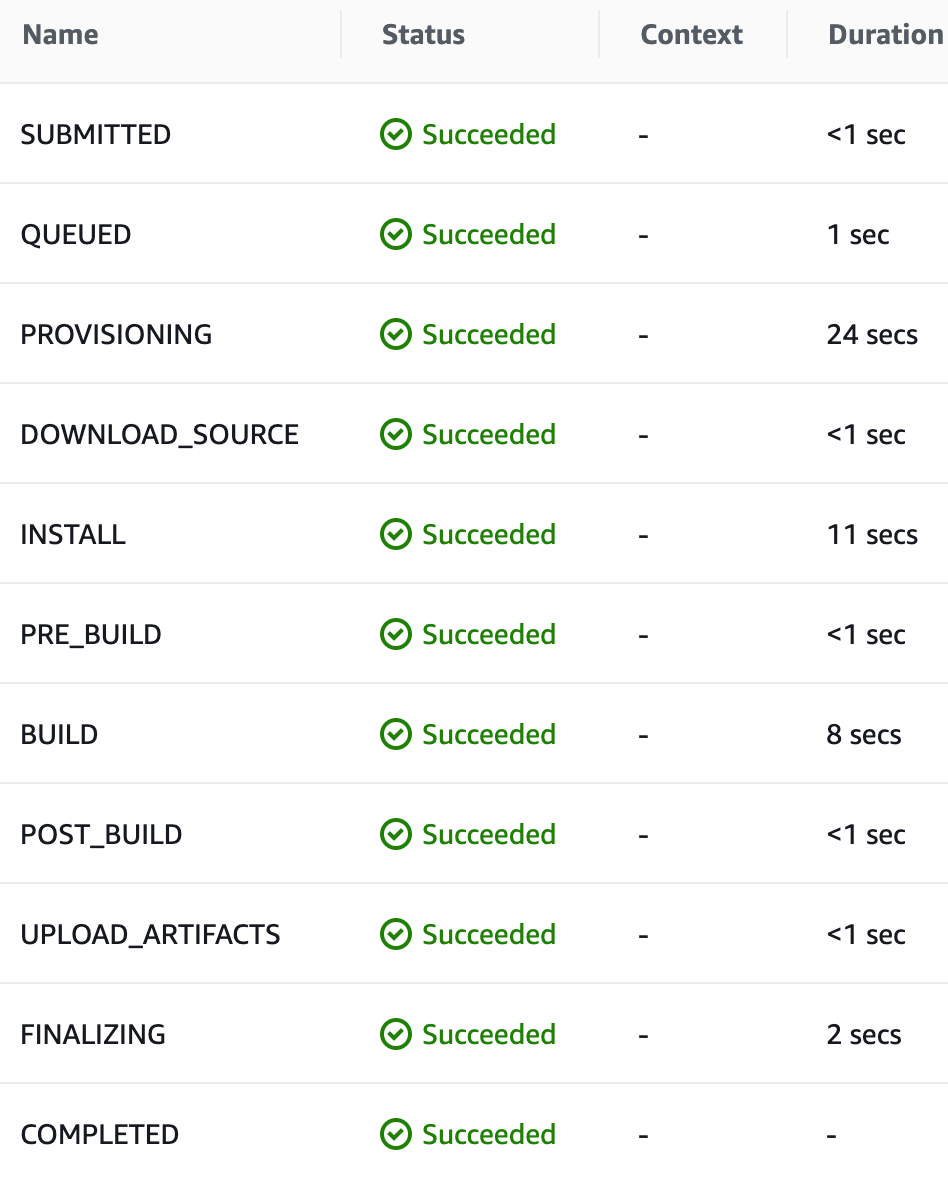
Total build and deploy time is pretty fast at under a minute:
The Complete Buildspec
Click to expand
    version: 0.2

    env:
    variables:
        hugo_version: "[YOUR_VERSION]"
        my_domain: "[YOUR_DOMAIN]"

    phases:
    install:
        runtime-versions:
        python: 3.8
        commands:
        - apt-get update
        - echo "Installing hugo ..."
        - curl -L -o hugo.deb "https://github.com/gohugoio/hugo/releases/download/v${hugo_version}/hugo_${hugo_version}_Linux-64bit.deb"
        - dpkg -i hugo.deb

    pre_build:
        commands:
        - echo "Entered pre_build ..."
        - echo Current directory is $CODEBUILD_SRC_DIR
        - ls -la
    build:
        commands:
        - echo "Building site ..."
        - hugo
        - echo "Updating content in S3 ..."
        - aws s3 sync public/ s3://${my_domain} --region us-east-1 --delete
        - echo "Invalidating CloudFront distribution ..."
        - aws cloudfront list-distributions --output=json --query "DistributionList.Items[].{DomainName:DomainName, OriginDomainName:Origins.Items[0].DomainName, Id:Id}[?contains(OriginDomainName, '${my_domain}')] | [0]" | jq -r '.Id' | xargs -I{} aws cloudfront create-invalidation --paths '/*' --distribution-id={}
        finally:
        - echo "Build and Deploy Complete"
    artifacts:
    files:
        - '**/*'
    base-directory: public
Additional Resources
There were many sites I referenced to get ideas while building this out. Here’s a short list in case they’re useful to you:
- Deploy a Website to S3 and Cloudfront with Terraform
- My Wordpress to Hugo Migration #1 - Why
- Hosting Our Static Site over SSL with S3, ACM, CloudFront and Terraform
- Deploy a Secure Static Site with AWS & Terraform
- Running a Static Site with SSL on AWS
- hugo’t to know how this blog is setup!
- AWS Serverless Infrastructure for Static Website based on Hugo
- High Performance Website with AWS, Hugo & Terraform
- STATIC S3 WEBSITE WITH CICD - WALKTHROUGH
- Implementing Default Directory Indexes in Amazon S3-backed Amazon CloudFront Origins Using Lambda@Edge
- Turn off S3 public access with CloudFront origin access and Lambda@Edge
- Adding HTTP Security Headers Using Lambda@Edge and Amazon CloudFront
- Restricting Access to Amazon S3 Content by Using an Origin Access Identity
Conclusion
There may be some other tweaks I end up making in the future such as adding SNS notifications or real-time CloudFront logging, but my goal was to keep this pretty simple and I think I’ve achieved that. You could tweak this any number of other ways to better suit your needs – different static site generator, git repo, orchestration tool, infastructure stack, etc.
With the exception of maybe the CloudFront invalidation technique which took me a several tries to get the syntax correct, there’s not much here that’s new or can’t be found on any number of other sites. At the very least, hopefully this demonstrates that it’s pretty simple to get a static website up and running quickly with AWS.
Over time I plan to transition content from my other site (SecuritySift), which is still hosted on a traditional Wordpress server over to here. For now you can find a link to that content in the top navigation bar.